
CLZ Music, CD/vinyl collection
CLZMusic & Audio
4.7445.00 Reviews
- Version
- 11.1.3
- Installs
- 100.00K
- Age Rating
- Everyone
Screenshots
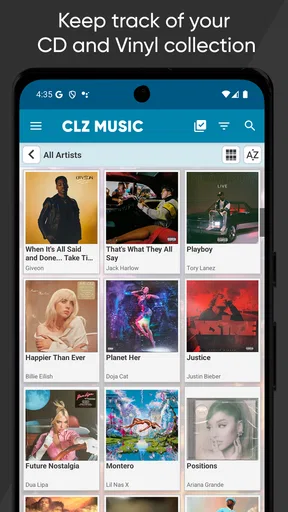
Our Review of CLZ Music, CD/vinyl collection
 Analysis by Appyee
I have always found music collecting easier than music organizing. A shelf full of CDs and records can feel satisfying, but remembering exactly what I own, which pressing I still want, or whether a title is already buried in another room is much harder. CLZ Music is built for that practical gap. It is a Music & Audio app from CLZ that turns a physical collection into a searchable personal catalog, with barcode scanning as the main way to add albums.
After using it as a collection tool rather than as a music player, I came away with a clear impression: this is aimed at people who care about the details of their physical library. It is not trying to replace a streaming service, and it is not a general playlist app. Its value comes from helping you see, maintain, and make decisions about the albums you already own.
The app is free to install and suitable for Everyone, although in-app purchases range from $0.99 to $19.99 per item. The store summary also presents the service as costing US $20 per year, so it is worth checking the current purchase screen before you commit to using it as your long-term catalog. It has been available since December 6, 2010, and its current version is 11.1.3, which gives the project the feel of a mature cataloging product rather than a newly launched experiment.
Building a reliable catalog from the shelf
I approach a physical music catalog as something I need to trust later, not just a list I can fill quickly. In this section, I focus on building that trust from the first shelf: keeping each scanning session manageable, checking entries when editions matter, and making the digital record useful when I am sorting or shopping. A steady routine matters more than trying to catalog everything at once.
The first pass is simple, but preparation matters
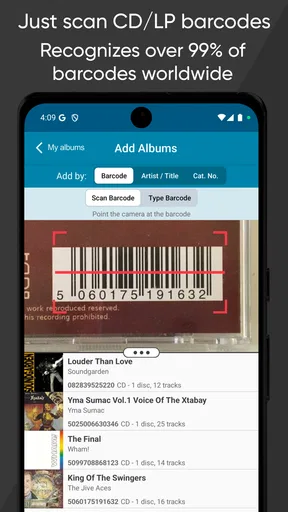
The basic workflow is pleasantly direct. I pick up an album, scan its barcode, check what the app recognizes, and move on to the next item. That is much less tiring than typing artist names, album titles, labels, and release details one by one. For a collection spread across several shelves, the barcode-first approach makes the initial cataloging session feel manageable.
My advice is not to begin with the entire house in one ambitious session. Start with one shelf or one box and keep the physical albums in the same order while scanning. That small habit makes mistakes easier to find later. If an item is missed, you can spot the gap immediately instead of wondering whether it was skipped three rooms ago.
Barcode scanning is especially useful for ordinary retail editions. The less common the release, the more carefully I would review the result before treating it as final. CDs and vinyl records can have multiple editions with similar artwork, and a barcode may identify a release family without answering every question a serious collector has about a pressing. I would use the scan as a fast starting point, not as permission to stop checking.
That distinction is important. A catalog can look complete while still containing small inaccuracies that matter later. If you collect casually, an album title and artist may be enough. If you buy duplicates, compare editions, or trade records, you should inspect the details and correct anything that does not match the item in your hand.
Use the catalog for decisions, not just for counting
The strongest everyday use is answering questions at the exact moment they come up. At a record shop, I can search before buying a familiar album again. When helping someone choose music for a trip, I can browse what I actually own instead of relying on memory. While sorting shelves, I can use the catalog as a second view of the collection rather than repeatedly pulling albums out to confirm them.
A realistic scenario is a weekend visit to a used record store. I see a promising title, open the catalog, and check whether it is already there. If it is, I can compare the copy in front of me with the one I own instead of making a duplicate purchase by accident. If I am deliberately collecting different editions, the same check becomes a buying aid: the app helps me remember that owning the album is not necessarily the same as owning the version I want.
That is where a dedicated collection app has an advantage over notes, spreadsheets, or a photo folder. A spreadsheet can be flexible, but it asks you to design and maintain the structure yourself. Photos show the shelves, but they are poor at answering a precise search. A general notes app can hold lists, yet it usually lacks the focused rhythm of scanning and reviewing music entries.
On the other hand, a spreadsheet may still be better for someone who wants unusual custom fields, complex financial tracking, or a completely personal database design. CLZ Music makes more sense when you want a ready-made cataloging workflow and would rather spend time organizing albums than building the system that stores them.
Keep physical organization and digital organization aligned
One subtle problem with any collection catalog is that digital accuracy does not guarantee physical accuracy. If I scan an album and later move it to another shelf, the app may still tell me that I own it, but it will not magically make the physical search easier unless I maintain whatever location approach I have chosen. I found it useful to treat cataloging and shelving as one routine: scan a batch, decide where that batch belongs, and avoid leaving the physical items in temporary piles.
This is also a good time to decide how much detail you genuinely need. A catalog becomes less useful when every entry turns into a long research project. For common albums, confirm the basics and continue. Reserve deeper checking for records where edition, format, or duplication affects a buying decision. That balance keeps the app from becoming another hobby that competes with listening to music.
What the rating and adoption suggest
The app has a 4.7 average from around 3.7 thousand ratings, with more than 100 thousand installs. Those figures do not tell me whether it matches every collector’s habits, but they do fit my experience of a focused tool with a clear purpose. It is not trying to entertain you while you browse; it is trying to reduce the friction of knowing what is in your collection.
That focus will appeal to physical-media owners, collectors who shop frequently, and households where more than one person needs a dependable inventory. It will be less compelling for someone who only listens through streaming services or who has a small collection they can remember without help.
Settings that deserve attention before serious cataloging
The most useful settings are the ones that prevent inconsistency. Before scanning hundreds of albums, I would look through the app’s collection and display options and decide how I want entries to appear. The exact choices matter less than making them deliberately. If I change my preferred view every few days or record details differently from one session to the next, searches and browsing become less predictable.
I would also review how the app handles the difference between owning an album and wanting an album. Those are separate mental categories for many collectors. A wish list is useful when shopping, but mixing wanted titles with owned titles can make the catalog misleading. Keeping those purposes distinct helps the app answer two different questions: “Do I have this?” and “Am I still looking for this?”
Another setting-related habit is to check the app after an update rather than assuming every display or workflow detail remains exactly where I left it. The current version is 11.1.3, and mature apps can evolve gradually. I do not mean that updates are a problem; I mean that a quick review of the interface can save time when you return to cataloging after a long break.
For a large collection, I would also think about backup and account-related choices before investing many hours. A catalog represents work, not just data. I prefer to understand how my entries are preserved and how I would recover from changing devices before I make the app the only record of my shelves. That is a sensible precaution for any serious inventory, especially one built over many sessions.
Small settings choices improve browsing
Collection apps are used in two very different ways: quick lookup and relaxed browsing. A compact list is better when I am standing in a shop and checking one title. A more visual view is better when I am deciding what to play or rediscovering albums I have ignored. If the app lets me switch between those kinds of views, I would treat that as a practical part of the workflow rather than a cosmetic preference.
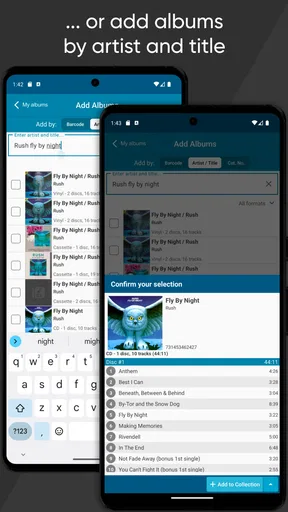
I also recommend deciding how you search. Searching by artist is natural when planning a listening session, while searching by title is faster when verifying a purchase. If you routinely use both, keep your catalog entries clean enough that either route works. Avoid adding personal abbreviations that only make sense to you unless they genuinely help your own retrieval process.
Faster patterns for repeat users
The biggest speed improvement is batching. Instead of scanning one album whenever it happens to cross your path, I would set aside a short, repeatable session for a single shelf, crate, or box. Put the phone in a comfortable position, keep the albums within reach, and check each result immediately. This reduces the mental cost of repeatedly starting and stopping.
A second useful pattern is separating capture from cleanup. During the first pass, add the albums and flag anything that needs closer attention. Do not interrupt every scan to investigate a questionable edition in depth. After the batch is captured, return to the flagged entries with the physical albums beside you. This keeps the fast part fast while still protecting accuracy where it matters.
A third pattern is using the catalog before shopping, not after. Many collectors remember the broad shape of their collection but forget duplicates, compilations, or albums bought years earlier. A quick search before entering a store changes the app from an archive into a buying tool. It can also help you create a focused shopping intention: look for a missing title, a different format, or a particular artist rather than buying whatever looks familiar.
I would make one more habit part of the routine: after buying several albums, catalog them before they disappear into the household. The longer new purchases remain in a “to be sorted” pile, the more likely they are to be forgotten. A short scan session at the end of a shopping day is easier than reconstructing purchases weeks later from receipts and memory.
Where shortcuts stop helping
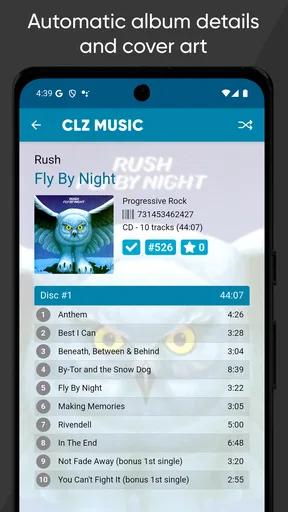
Barcode scanning is fast, but speed can create false confidence. A successful scan does not remove the need to compare the displayed entry with the physical release when the distinction matters. This is particularly important for collectors who care about alternate editions, regional variations, or condition-related notes. The app can make the first ninety percent of the work easier; the final judgment still belongs to the collector.
I would also avoid treating automatic catalog information as a substitute for personal organization. If your collection has a special shelving system, lending history, purchase notes, or grading method, you may need to add your own discipline around the app. The more specialized your collecting habits become, the more important it is to test a small section before committing to a full migration.
Advanced limits and the subscription question
The main limitation is that CLZ Music is a cataloging tool, not a complete replacement for every music-related service. It does not change the fact that you still need a separate way to play albums, manage streaming playlists, or research the broader marketplace if those are central to your hobby. Its strength is inventory, and judging it as an all-purpose music app would be unfair.
Cost is another point to consider. The app is free, but it includes in-app purchases priced from $0.99 to $19.99 per item, while the store summary refers to US $20 per year. That may be reasonable for someone with a growing collection who uses the catalog every week. It is harder to justify for a person with a small shelf, a stable collection, or no interest in checking records before shopping.
I would begin with a modest trial of your real workflow rather than scanning everything immediately. Add a representative mix of the albums you own: common CDs, less familiar releases, and some records you would actually search for in a store. See whether the results are accurate enough for your standards and whether the browsing experience helps you. If it does, the ongoing cost is easier to evaluate because you are paying for a habit you already use, not for the hope that you might someday organize the collection.
There is also a human limit to cataloging. Some collectors enjoy the research as much as the music, while others want to finish quickly and listen. If every uncertain entry sends you into a long investigation, the app can turn a relaxing hobby into administrative work. In that case, a simpler personal list may be better, even if it contains fewer details.
Who should use it, and who should skip it?
I would recommend it to anyone with a physical CD or vinyl collection that has outgrown memory. It is especially suitable for people who buy used albums, share shelves with family members, move between rooms or homes, or want a dependable answer before purchasing a familiar title again. The barcode workflow is a real advantage when the collection is large enough that manual entry would become a barrier.
I would be more cautious if you only want a listening app. The catalog does not replace the convenience of streaming, and it will not make a digital library feel more social or spontaneous. I would also look elsewhere if your main requirement is a highly customized database with unusual formulas, detailed financial records, or a specialized grading system. A spreadsheet or a broader database tool may give you more control, though at the cost of more setup.
People who collect very rare pressings should approach it as a helpful inventory layer rather than an unquestionable authority. The app can save time identifying and organizing releases, but serious edition-level decisions still require careful inspection. That is not a failure of the product; it is the nature of physical music collecting, where similar packaging can hide meaningful differences.
My verdict after making the workflow repeatable
CLZ Music works best when I treat it as a small routine: scan new arrivals, review uncertain matches, keep wanted and owned items separate, and check the catalog before shopping. Those habits reveal its real value. It is not the flashy part of collecting, but it removes the annoying uncertainty that leads to duplicate purchases, forgotten albums, and shelves that are difficult to understand.
The app’s long availability, focused design, and strong 4.7 average make sense for this particular audience. The free entry point lowers the risk of trying it, while the purchase structure means committed users should decide whether the catalog earns a place in their regular budget. I would not pay simply because I own music; I would pay if I repeatedly need to search, verify, and manage that music.
My final recommendation is therefore specific: try it if your physical collection is active, growing, or difficult to remember. Start with one shelf, use barcode scanning for speed, and spend your attention only on entries where edition or ownership details matter. If you follow that approach, the real benefit is not merely having a list—it is making better decisions about the collection you already built.
For me, that makes CLZ Music a practical companion for dedicated CD and vinyl owners, rather than a universal music app. It is at its best in the moment before a purchase, during a careful sorting session, or when I want to browse what I truly own. If those moments happen often in your life, this catalog is worth serious consideration.
Verdict
Strengths of CLZ Music, CD/vinyl collection
- Scans barcodes quickly and fills in album details automatically.
- Supports CDs, vinyl, cassettes, digital albums, and box sets.
- Cloud syncing keeps your collection available across multiple devices.
- Powerful filters make it easy to find albums by artist, genre, or format.
- You can track duplicates, purchase dates, prices, and personal ratings.
Limitations of CLZ Music, CD/vinyl collection
- Some advanced features require a recurring subscription.
- Large collections may take time to organize and sync initially.
- Music metadata can occasionally need manual correction.
- The interface may feel crowded for users with small collections.
- Barcode scanning depends on good lighting and readable packaging.
Other Releases by CLZ
View All
CLZ Comics comic book database
Comics4.8
Similar Picks in This Category
View All
YouTube Music
Google LLC4.4

Samsung Music
Samsung Electronics Co., Ltd.3.8

Spotify: Music and Podcasts
Spotify AB4.3

JioSaavn - Music & Podcasts
Saavn Media Limited4.3

Lark Player:Music Player & MP3
Lark Player Studio - Music, MP3 & Video Player4.6

StarMaker: Sing Karaoke Songs
SKYWORK AI PTE. LTD.4.3
Frequently Asked Questions
What is CLZ Music, and who is it designed for?
CLZ Music is a collection-management app for people who own CDs, vinyl records, albums, and other physical music releases. It helps you create a searchable digital catalog by adding items through barcode scanning, title searches, or manual entry. The app is especially useful for collectors who want to track what they own, avoid duplicate purchases, and quickly check details such as artists, formats, editions, release years, and catalog numbers.
How do I add CDs and vinyl records to my CLZ Music collection?
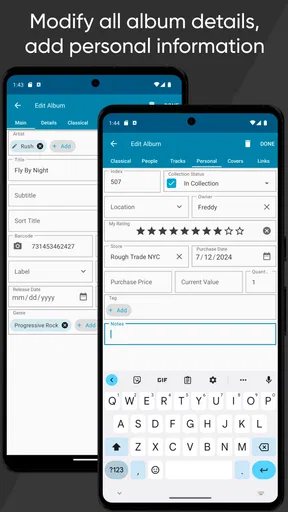
You can usually add music releases by scanning the barcode on the packaging with your phone’s camera, searching by artist or album title, or entering the information manually when a release cannot be found automatically. After selecting a matching result, you can review and edit details such as media format, pressing, condition, purchase information, and collection status. This makes the initial cataloging process considerably faster than creating every entry from scratch.
Does CLZ Music work with rare, imported, or unusual music editions?
CLZ Music can be useful for rare and international releases, but the quality of the automatically suggested information depends on whether the specific edition exists in its online database. Common albums are generally easier to identify, while obscure pressings, promotional copies, box sets, bootlegs, and records without barcodes may require manual editing. Collectors should carefully compare cover art, track listings, labels, catalog numbers, and release details before saving an entry.
Does CLZ Music require an internet connection or a subscription?
An internet connection is commonly needed when searching the CLZ database, downloading album information, synchronizing your collection, or using online backup features. Once records are stored on your device, you may still be able to browse much of your collection offline, although some online functions will not work. CLZ Music is a paid service rather than a completely free cataloging tool, so prospective users should check the current app-store pricing, trial terms, and subscription options before downloading.
Can I synchronize my collection between Android, iPhone, and other devices?
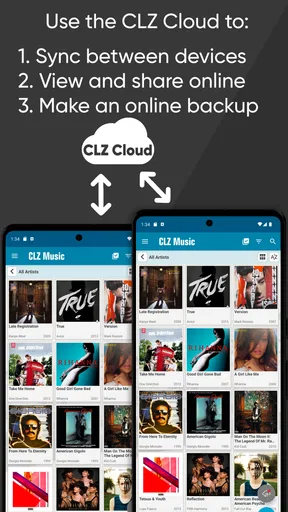
CLZ Music is designed to let collectors access the same catalog across supported devices by using a CLZ account and cloud synchronization. This is helpful if you switch between Android and iOS, use a tablet, or want a backup in addition to the copy stored on your phone. Before changing devices, make sure the latest version of your collection has finished syncing, and verify that your account and subscription provide access to the platforms you intend to use.
